
Find your artist ID on Spotify and Apple Music
Add your Spotify and Apple Music artist IDs when you create a release so it lands on the correct artist page instead of a duplicate profile. Here is where to find each ID on the web and in the apps.
Stores match releases to artist pages by name — and names aren’t unique. To make sure your release ends up on the correct artist page on Spotify and Apple Music (and not on a new duplicate profile, or someone else’s), add your Artist ID for each store when you create the release in Backstage. This article shows where to find both IDs.
- Spotify Artist ID 22 characters, e.g.
6gK1Uct5FEdaUWRWpU4CI2 - Apple Music Artist ID Numbers only, e.g.
978442302 - Where to enter them Backstage → release → artist details [CONFIRM: exact field label]
- First release ever? Leave blank — the store creates your page
Spotify#
On the web browser#
Open your artist page on open.spotify.com. The Artist ID is the block of letters and numbers in the address bar between artist/ and ?:
https://open.spotify.com/artist/6gK1Uct5FEdaUWRWpU4CI2?si=…
                                ↑ Artist ID: 6gK1Uct5FEdaUWRWpU4CI2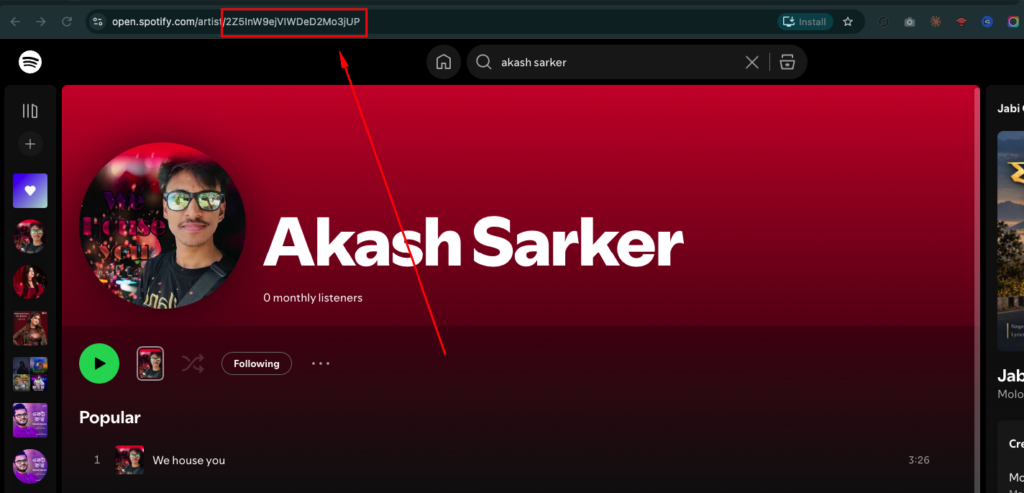
In the Spotify app#
- Open the artist page and tap the ⋯ (more) button.
- Tap Share → Copy Spotify URI (on some versions: Copy link).
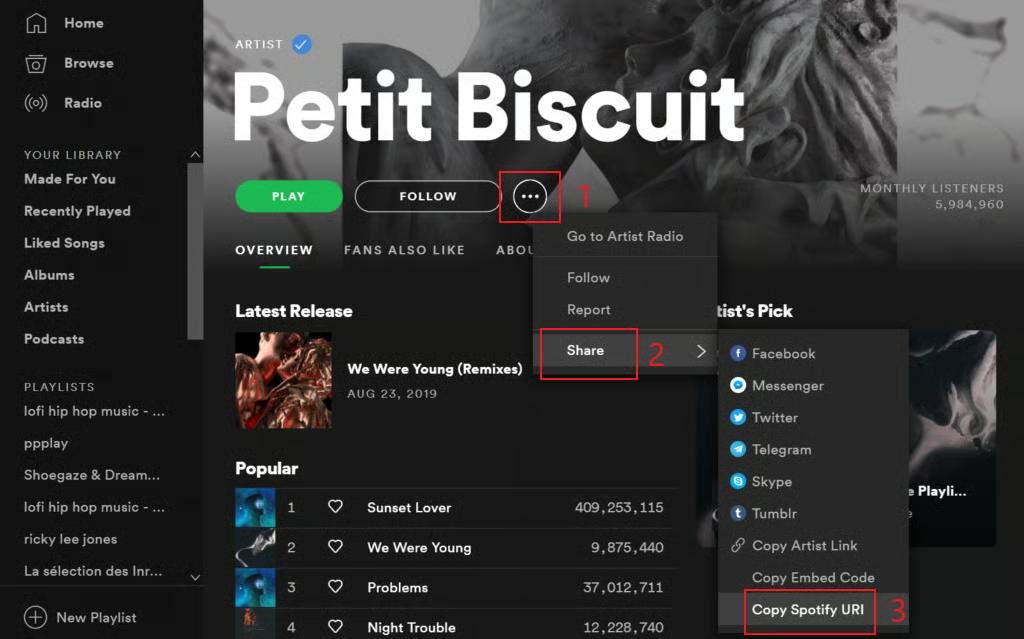
Spotify app: artist page → ⋯ → Share → Copy Spotify URI - Paste it somewhere. A URI looks like
spotify:artist:6gK1Uct5FEdaUWRWpU4CI2— the last block of characters is your Artist ID. If you copied a link instead, the ID sits betweenartist/and?as above.
You can paste the full Spotify URI or link into Backstage as well — we extract the ID automatically. [CONFIRM: Backstage accepts full URI/links, not just the ID]
Apple Music#
On the web browser#
Open your artist page on music.apple.com. The Artist ID is the number at the end of the URL:
https://music.apple.com/us/artist/petit-biscuit/978442302
                                                 ↑ Artist ID: 978442302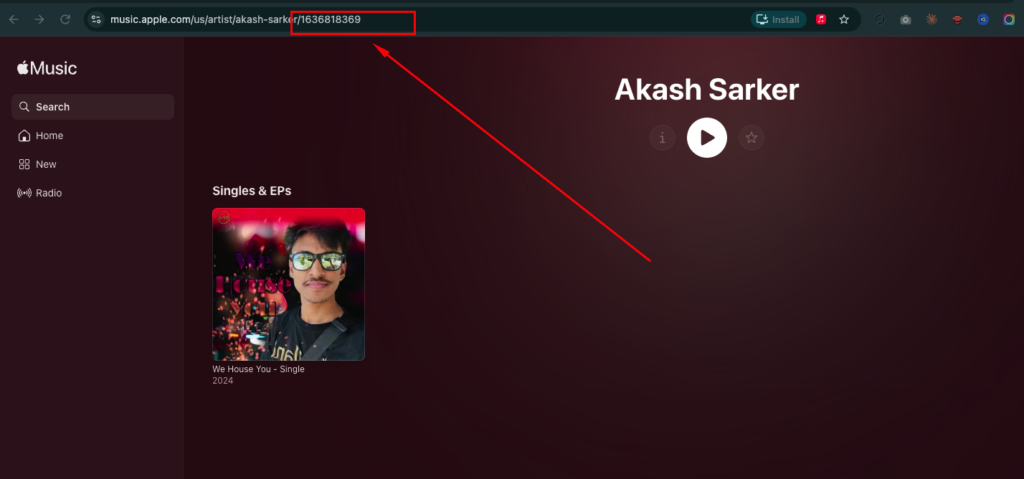
In the Apple Music / iTunes app#
- Open the artist page and click the ⋯ or share button.
- Choose Copy Link. It produces the same URL as the web browser.
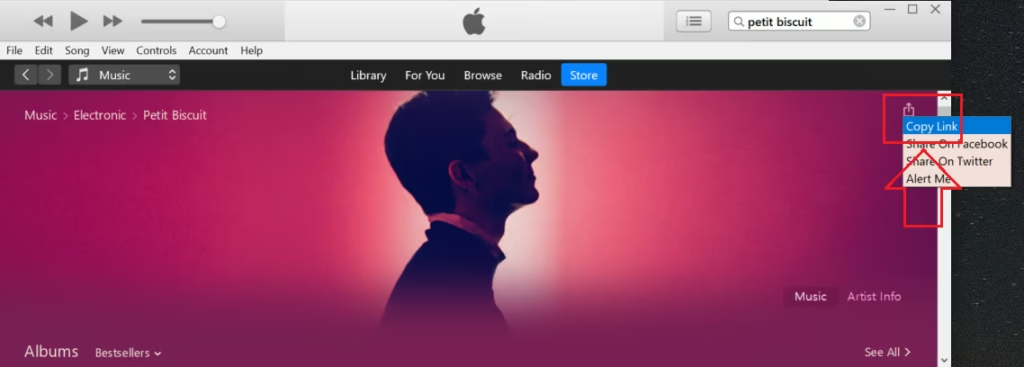
Apple Music app: artist page → share → Copy Link - The last characters of the link (after the final
/) are your Artist ID.
If a release has already been mapped to a duplicate or incorrect artist page, don’t create a new release. Open a ticket with the release UPC and links to both the correct and the incorrect artist pages, and we’ll ask the store to move it. Adding your IDs to future releases prevents it happening again.
For YouTube, the equivalent is linking your channel to your Topic channel via an Official Artist Channel — see OAC certification.
Thanks — your feedback helps us improve this article.
Still stuck?
Our support team answers tickets every business day. Include your account email and the release UPC or ISRC so we can jump straight in.